If your goal is to keep your family’s life effortlessly synced, clearly scheduled and distraction‑free, then the Skylight Calendar stands out with single‑purpose precision. On the flip side, the Echo Show brings streaming, Alexa, smart‑home control and more—but with added complexity and cost. For focused coordination, Skylight wins; for full media and hub power, Echo is the pick.
Let’s make long story short: I strongly recommend the Skylight Calendar. It delivers instant visibility, uncomplicated setup and true family coordination value no fluff, full focus.
Why Do I Recommend the Skylight Calendar?
- Built for routines and clarity – A 15” touchscreen wall planner synced with Google, iCloud, Outlook and Cozi calendars makes staying organized effortless.
- Minimal distractions, maximum impact – No streaming apps, no fluff just a clean digital planner with chore charts, meal‑planning and lists built‑in.
- Plug‑in and go simplicity – Set up in minutes, everyone’s calendars appear and even the youngest family members can engage with chores and tasks.
- High value for household utility – You’re not paying for unused entertainment bells—this is a tool that improves everyday life, simplicity that pays off. Choose the Skylight Calendar now and transform how your household moves through each day—clearer, calmer, smarter.
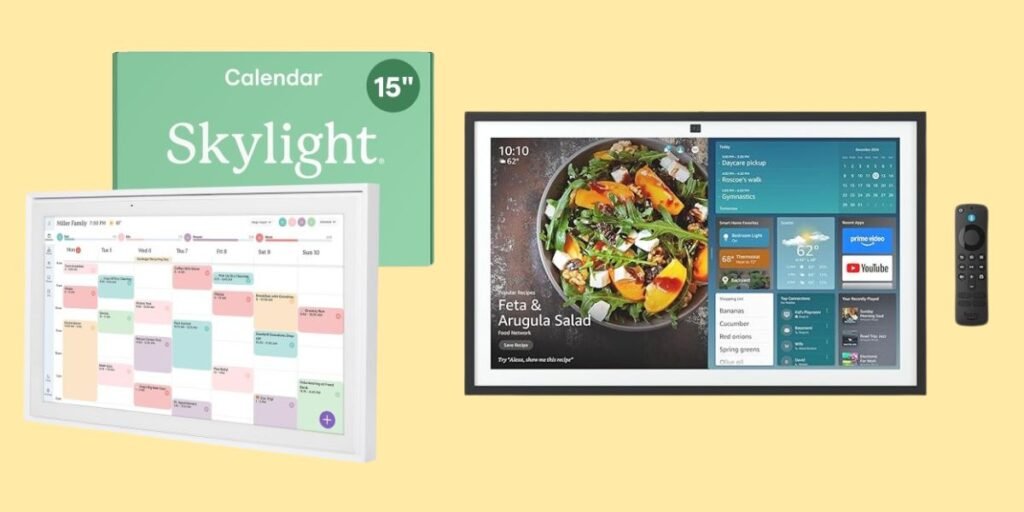
Detailed Comparison & Recommendation
| Feature | Echo Show | Skylight Calendar | Which Is Best & Why? |
|---|---|---|---|
| Core Purpose | Smart display with Fire TV, Alexa, smart‑home control. | Dedicated digital calendar and family‑planner display. | For media and control: Echo. For schedules only: Skylight. |
| Distraction Level | High—apps, streaming, myriad features. | Low—just calendar, chores, lists. | Skylight wins for focused coordination. |
| Setup & Family Usage | Requires smart‑home setup, more learning curve. | Quick to mount or stand, intuitive for all ages. | Skylight is superior for family adoption. |
| Check Best Seller | Check Echo Show Lowest Price | Check Skylight Calendar Lowest Price | For tight budget & clarity: Skylight. For full hub: Echo. |
What Are the Major Differences Between Skylight Calendar vs Echo Show?
- Capabilities: Skylight excels in scheduling, chores and lists; Echo Show offers full entertainment, voice assistant and smart‑home hub features.
- Experience: Skylight keeps your wall‑space organized and focused; Echo Show invites interaction, streaming and control—great if you’ll use it.
- Value trade‑off: If your home needs a tool to sync and simplify everyone’s life, Skylight gets more done at less cost. If you want an all‑in‑one entertainment + control center, go Echo.
Check Skylight Calendar Limited Time Deal Here
What Users Are Saying about Skylight Calendar vs Echo Show
| Model | Feedback Highlights |
|---|---|
| Skylight Calendar | “Perfect to sync up our calendars, have to‑do lists and it was so easy to set up.” – Reddit user |
| Echo Show | “Large display and hub features are great—just need the space and want the full control.” – Reviewers |
Fair Advice to Consider
- Choose Skylight Calendar if your main goal is: better visibility of tasks, shared family planning, fewer distractions.
- Opt for Echo Show if you already use Alexa, stream often and want your display to double as a full media/control hub.
- Measure your space: Skylight is designed to mount/stand easily; Echo Show may require wall‑mount and more room.
- Watch for deals: Both devices often drop during holiday smart‑home promotions—track pricing before you buy.
Quick Comparison
| Spec | Echo Show | Skylight Calendar |
|---|---|---|
| Primary Use | Media + smart‑home hub | Family scheduling & coordination |
| Distraction Level | High | Low |
| Setup & Adoption | More complex | Simple |
| Best For | Entertainment, control, tech | Shared calendars, chores, routines |
| Recommended Best Seller | Check Echo Show Lowest Price | Check Skylight Calendar Lowest Price |
Quick Summary
If your priority is to get everyone in the home aligned, visible and moving forward together choose the Skylight Calendar. If you want a full smart‑display that entertains, controls devices and handles streaming then the Echo Show is a strong choice. For a streamlined, distraction-free home hub, Skylight is the smarter investment.
FAQs
Can the Skylight Calendar stream videos or run Alexa skills?
No—its design focuses exclusively on scheduling, not streaming or voice‑assistant features.
Does the Echo Show require additional subscriptions to use effectively?
No subscription for core functions, but streaming apps and some services may require their own subscriptions.
Which device fits better in a small kitchen or hallway?
The Skylight Calendar takes up less visual load and is designed to mount or stand discreetly—great for smaller spaces.
Can the Skylight Calendar sync with multiple family members’ calendars?
Yes—supports Google, iCloud, Outlook, Cozi, Yahoo and allows color‑coding each member.
Final Verdict
For families seeking clarity, cohesion and fewer screens to worry about, the Skylight Calendar delivers. The Echo Show is excellent if you want to build a full smart‑home and entertainment hub—but if coordination and simplicity are your priorities, go Skylight and bring your household into sync today.
Jump To