When it’s time to upgrade your hybrid meeting setup, choosing between the Meeting Owl 3 and the newer Owl 4 isn’t just a tech decision—it’s a communication upgrade that could redefine how your team connects. The Meeting Owl 3 and Meeting Owl 4 both deliver 360° video, beam‑forming microphones and plug‑and‑play simplicity—but one is clearly designed for future‑proof performance while the other nails the basics at a friendlier cost.
Let’s make long story short: If you’re deciding between Meeting Owl 3 and Meeting Owl 4, here’s the real deal: Go with the Meeting Owl 3 for excellent coverage, Owl 3 gives you the signature 360° video + mic experience with plug-and-play ease setup and outstanding value today. If you need ultra‑high‑definition 4K, enterprise connectivity and longer‑range audio, then the Meeting Owl 4 is worth the premium.
Why Do I Recommend the Meeting Owl 3?
- Full‑Room Coverage in 1080p – The Owl 3 captures 360° video, auto‑focuses on the speaker and covers up to 18 ft audio pickup radius.
- Plug‑and‑Play Simplicity – No complicated setup, it works with Zoom, Teams, Google Meet right out of the box.
- Great Value for Full Features – You get impressive hybrid‑meeting tech (360° cam + 8‑mic array + built‑in speakers) without enterprise‑level cost.
- Perfect Fit for Small to Mid Rooms – With a 10 ft video radius and 18 ft audio range, Owl 3 covers most huddle spaces and conference rooms.
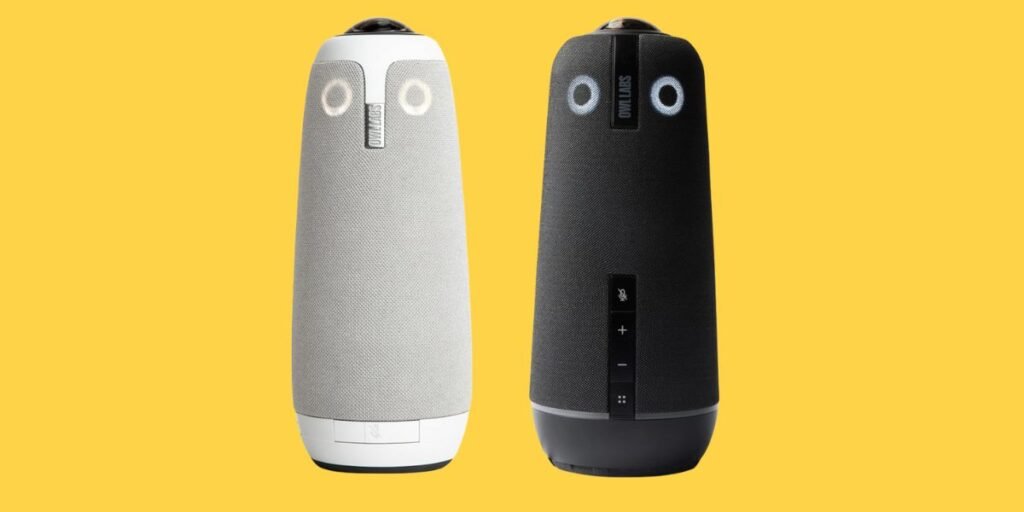
Detailed Comparison & Recommendation
| Feature | Meeting Owl 3 | Meeting Owl 4 | Which Is Best & Why? |
|---|---|---|---|
| Video Resolution | 1080p HD, 360° field of view, 10 ft radius | 4K UHD, 360° view, same 10 ft radius | Owl 4 wins if 4K and future‑proofing matter. |
| Audio Pickup & Mic Array | 8 omni‑directional mics, 18 ft radius | 8 mics, 18 ft radius with enterprise add‑ons | Tie for basic audio; Owl 4 has enterprise add‑ons. |
| Enterprise/Network Features | Standard USB‑C USB connection | Supports Ethernet, PoE, enterprise Wi‑Fi | Owl 4 wins for complex corporate setups. |
| Room‑Scale & Expansion | Works well with dual units for larger rooms | Same scaling supported with enterprise kit | Tie—both scalable, but Owl 4 scaled for larger enterprise. |
| Winner | Meeting Owl 3 | ||
| Check Best Seller | Check Meeting Owl 3 Lowest Price | Check Meeting Owl 4 Lowest Price | Owl 3 wins if price/value is priority. |
What Is the Major Difference Between Meeting Owl 3 vs Meeting Owl 4?
- Resolution & Future‑Proofing: Owl 4 steps up to 4K UHD and enterprise connectivity. Owl 3 stays at 1080p but covers most needs well.
- Enterprise Features: Owl 4 adds PoE, Ethernet, advanced network support—ideal for IT‑managed rooms. Owl 3 remains plug‑and‑play.
- Budget vs Performance: If you need excellent meetings now without overspending, Owl 3 is smart. If you run large conference rooms, need pristine 4K, or plan to scale, Owl 4 pays off.
Check Meeting Owl 3 Limited Time Deal Here
What Users Are Saying
| Feature | Meeting Owl 3 | Meeting Owl 4 |
|---|---|---|
| Setup & Ease | “Minutes to set up, full‑room view works great for hybrid team.” | “Impressive 4K clarity but need enterprise network know‑how.” |
| Video & Audio Quality | “Clear video, good mic coverage for our 6‑person room.” | “Amazing detail in large boardroom, pays off for big spaces.” |
| Value for Money | “Best budget all‑in‑one 360° conferencing unit we found.” | “Premium price but the extra features justify it in our boardroom.” |
| Recommended Best Seller | Check Meeting Owl 3 Lowest Price | Check Meeting Owl 4 Lowest Price |
Fair Advice to Consider
- Choose Meeting Owl 3 if you run a small to medium meeting space (4‑10 people), need simple plug‑and‑play setup, and want superb value.
- Consider Meeting Owl 4 only if you manage large rooms, need certified enterprise connectivity, or demand 4K video and PoE.
- Check room size and connectivity: if your space is under 12 ft wide and uses USB‑C, Owl 3 will be more than enough.
- If you already have a pro‑AV network, multiple camera sites or managed IT, then Owl 4 might be the smarter long‑term choice.
Quick Comparison
| Spec | Meeting Owl 3 | Meeting Owl 4 |
|---|---|---|
| Video Resolution | 1080p HD | 4K UHD |
| Audio Pickup Radius | 18 ft (5.5 m) | 18 ft |
| Enterprise Connectivity | USB‑C only | Ethernet, PoE, Wi‑Fi |
| Price | Lower cost | Premium cost |
| Best For | Huddle rooms, budget | Boardrooms, enterprise |
| Recommended Best Seller | Check Meeting Owl 3 Lowest Price | Check Meeting Owl 4 Lowest Price |
Quick Summary
For most teams working in hybrid setups, the Meeting Owl 3 delivers full‑room 360° video, smart mic coverage and seamless integration—all at a far better value. The Meeting Owl 4 raises the bar for large rooms, 4K streaming and enterprise deployment—but only justifies its premium in those demanding scenarios.
FAQs
Do both work with Zoom, Teams, Google Meet?
Yes—both are plug‑and‑play compatible with major platforms.
Can I expand their coverage?
Yes—both support pairing multiple units or adding expansion mics for larger rooms.
Is the 10 ft radius enough?
For typical conference tables and rooms up to ~10 people, yes. Larger rooms may need paired units.
Will 4K matter if my team uses 1080p monitors?
Possibly less so—unless you archive meetings or project in large venues, 1080p may suffice.
Which has better long‑term support?
Owl 4 offers more enterprise features and may therefore age better in large‑scale setups.
Final Verdict
For robust, high‑value hybrid meeting coverage that works today and keeps things simple, the Meeting Owl 3 is the smart choice. If you’re outfitting larger boardrooms, require ultra‑HD and enterprise integrations, then the Meeting Owl 4 earns its premium. Choose confidently and power your meetings with clarity, flexibility—and peace of mind.
Jump To