When it comes to creating custom stickers, labels, or small‑batch print‑and‑cut projects, Liene PixCut S1 and Cricut Maker both shine but in different ways. PixCut S1 boosts convenience with all‑in‑one print‑and‑cut sticker production. Cricut Maker delivers unmatched versatility across hundreds of materials for bigger creative ambitions. If you want a quick sticker machine that gets the job done fast, PixCut S1 wins. If you need broad capability for vinyl, fabric, paper, wood and more Cricut Maker is the powerhouse.
Let’s make long story short: I strongly recommend the Liene PixCut S1. It delivers instant sticker + label creation under 2 minutes, bringing convenience, portability, and impressive print‑cut clarity ideal for hobbyists, small businesses, or anyone wanting fast, beautiful custom stickers without fuss.
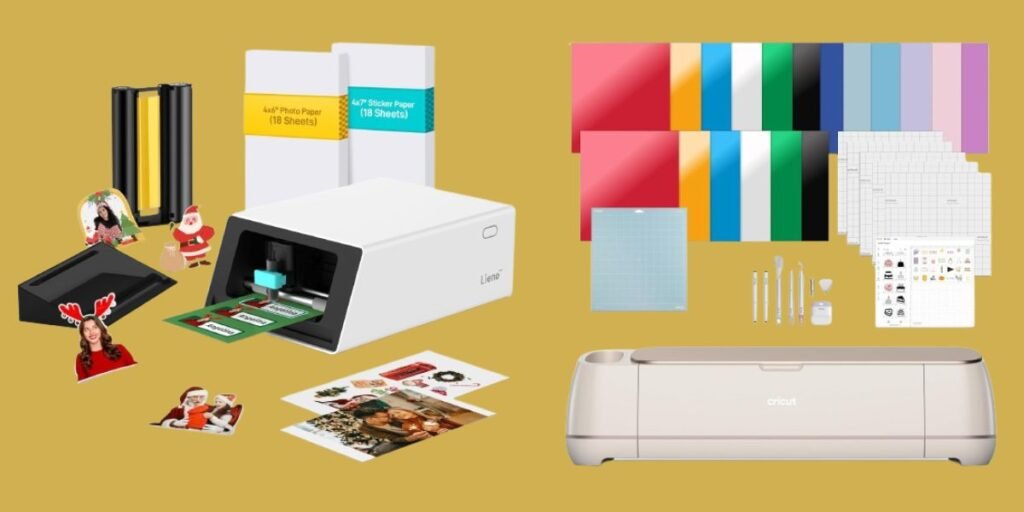
Detailed Comparison & Recommendation
| Feature / Capability | Liene PixCut S1 | Cricut Maker | Which Is Best & Why? |
|---|---|---|---|
| Core Purpose | All-in-one photo/sticker printer + cutter (print → laminate → auto‑cut) | Universal smart cutting machine for vinyl, paper, fabric, wood, leather, etc. | PixCut S1 — if you want instant stickers/labels; Cricut Maker — for broader crafting. |
| Print + Cut Workflow | Full automation: print, laminate, cut in ~2 mins — no manual trimming. | Cut-only; printing requires separate printer & manual feed for “print‑then‑cut”. | PixCut S1 — simpler, faster, cleaner workflow. |
| Color Output / Print Quality | 300 DPI dye‑sublimation prints, vivid & photo‑like on sticker/photo paper. | No built‑in printing — quality depends on external printer + cut precision. | PixCut S1 — better for reliable sticker/photo output. |
| Material & Use‑case Range | Limited to sticker/photo paper (4×6″/4×7″) — ideal for stickers, labels, photos, passport‑style prints. | Supports 300+ materials: vinyl, cardstock, fabric, wood veneer, leather, etc. | Cricut Maker — for wide‑ranging craft projects beyond stickers. |
| Ease & Speed | Very fast, minimal learning curve — user-friendly app, AI auto‑cut, ideal for beginners. | Requires more setup, mats, potentially steeper learning curve — but highly flexible. | PixCut S1 — best for quick, uncomplicated sticker/photo jobs. |
| Project Types | Stickers, photo prints, labels, ID‑style prints, phone skins, small custom prints. | Vinyl decals, custom apparel, wood/metal crafts, cards, large format cutting, multi‑material projects. | Cricut Maker — for multi‑material, advanced crafts; PixCut S1 — for stickers & quick labels. |
| Check Best Seller | Check Liene PixCut S1 Lowest Price | Check Cricut Maker Lowest Price | Check Best Seller Offers |
What Are the Major Differences Between PixCut S1 & Cricut Maker?
- Workflow Speed & Effort: PixCut S1 → print + laminate + cut in one step, no manual trimming — Cricut Maker → cutting only, requires external printer & manual prep.
- Material Flexibility: Cricut Maker handles 300 + material types (vinyl, fabric, leather, wood, etc.) — PixCut S1 is limited to sticker/photo paper.
- Best Use‑Case: PixCut S1 excels in fast sticker/photo label creation, scrapbooking, small‑batch printing; Cricut Maker excels in diverse crafts, big projects, multi‑material designs.
- User Experience & Speed: PixCut S1 is ideal for beginners or those wanting instant output with minimal steps; Cricut Maker is better for experienced makers or those requiring versatility.
Check Liene PixCut S1 Limited Time Deal Here
What Users Are Saying
| Product | Common Feedback / Reviews |
|---|---|
| PixCut S1 | Super easy to use, prints and cuts stickers in minutes” Colors pop and quality is great for homemade stickers and label projects .Some note adhesive strength could be better or that sticker paper quality varies — but overall positive for photo‑sticker use. |
| Cricut Maker | Extremely versatile — ideal for vinyl decals, T‑shirts, wood crafts, cards, custom apparel, etc. Large maker community, strong support, but requires external printer for full‑color stickers/photos and more setup effort. |
Fair Advice to Consider
- Choose PixCut S1 if you mostly want to print stickers, labels, small‑batch photos, phone skins, or personalized items — and value speed, simplicity, and compact size.
- Choose Cricut Maker if you intend to work with vinyl, fabric, cardstock, wood, or want to build larger and more varied DIY projects (decals, apparel, signage, crafts, etc.).
- Remember: PixCut S1 uses proprietary sticker/photo paper — recurring cost and media limit should be considered.
- Cricut Maker does not print — you’ll need a separate printer if you want full‑color stickers or photos; output quality then depends on that printer.
Quick Summary
- PixCut S1 — Best for sticker/photo printing and cutting with minimal steps. Fast, convenient, compact — perfect for hobbyists, small business stickers, gift tags, labels, custom photo prints.
- Cricut Maker — Best for multi‑material DIY crafts, home decor, apparel, vinyl decals, cardstock projects, and more. Great if you need versatility across materials and project types.
FAQs
Can PixCut S1 cut vinyl, fabric, or wood?
No — it’s designed for sticker/photo paper only. For vinyl, fabric, or wood cutting, a machine like Cricut Maker is required.
Does Cricut Maker print photos or stickers directly?
No — Cricut Maker cuts designs. For full‑color prints, you must use a separate inkjet/laser printer, then use “print‑then‑cut” workflow.
Which machine is better for beginners?
PixCut S1 — far simpler setup and nearly no learning curve for sticker/photo printing. Cricut Maker has more features, but comes with setup and material‑preparation overhead.
Are the stickers/photos from PixCut S1 durable?
Yes — thanks to dye‑sublimation & automatic lamination, prints are vibrant, water‑resistant, scratch‑resistant and fade‑resistant.
Final Verdict — Go with PixCut S1
If your main goal is quick, beautiful stickers, labels, custom photo prints, or small creative projects — the PixCut S1 is the smarter, easier, faster choice. It delivers bright, professional‑looking stickers & photos with minimal setup, no fuss, and full automation. For small‑business owners, crafters, or anyone who wants print‑and‑cut simplicity, PixCut S1 is the ideal pick. Only consider Cricut Maker if you need heavy‑duty versatility across many materials and a broader range of craft applications beyond sticker/photo printing. PixCut S1 brings instant creativity — buy it today and start making your custom stickers and memories come to life!
Jump To