Juggling work, school, and chores across the whole family? You need a smart calendar that actually keeps up. Two top contenders Dragon Touch Digital Calendar and Skylight Calendar claim to bring order to your chaos. But only one truly delivers the magic of clarity, ease, and control in one sleek screen. Let’s reveal the real winner.
Let’s make long story short: If you’re after a basic family calendar with some core scheduling and reminder tools, the Dragon Touch will serve you fine at a slightly lower price. But if you want a smoother interface, faster syncing, a more polished visual layout, and better overall usability (especially for families with kids), the Skylight Calendar is the smarter pick and worth every extra dollar.
Why Do I Recommend the Skylight Calendar?
- Superior calendar syncing & integration – Skylight connects with all major digital calendars (Google, iCloud, Outlook, Cozi, Yahoo), bringing everything into one place without manual entry. This ensures that events update automatically and accurately across devices.
- Highly intuitive touchscreen interface – Users consistently report that the Skylight Calendar’s touchscreen is simple to use, even for non‑tech users, which encourages daily engagement and reduces the “forgotten schedule” problem.
- Color‑coded views & chore tracking for families – Assign colors to each family member and visualize schedules at a glance, making planning straightforward and keeping kids informed and involved.
- Flexible placement with wall or tabletop modes – Whether mounted in the kitchen or perched on a countertop, Skylight fits into daily routines without clutter.
- Daily household utility beyond calendar events – From chore lists and meal planning to grocery reminders and shared schedules, Skylight excels in making planning a shared activity rather than a solo task.
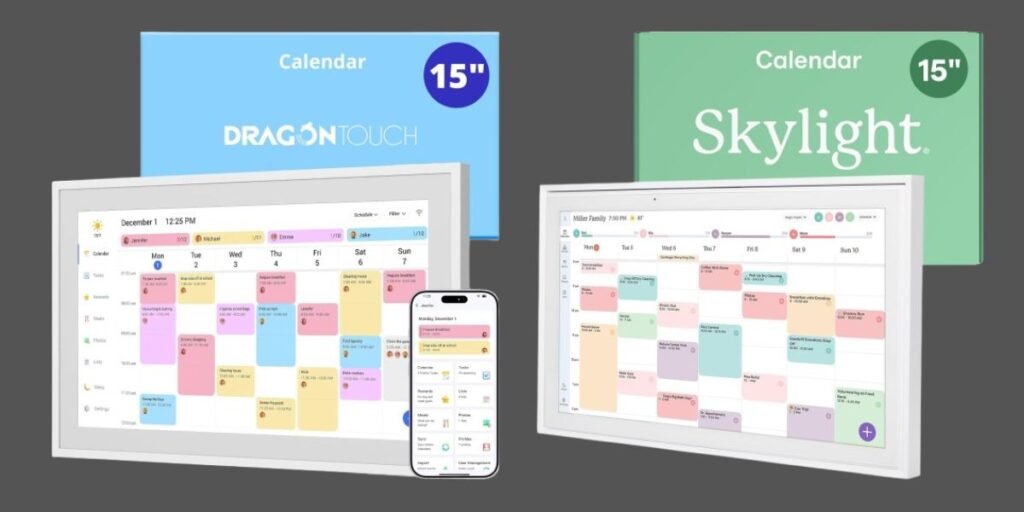
Detailed Comparison & Recommendation
| Feature | Dragon Touch Digital Calendar | Skylight Calendar | Which Is Best & Why? |
|---|---|---|---|
| Calendar Sync & Integration | Basic, app‑linked | Syncs with Google, iCloud, Outlook, Cozi, Yahoo | Skylight — deeper, wider sync support. |
| User Interface | Full HD touchscreen | Intuitive touch with color coding | Skylight — simpler and smoother. |
| Chore & Task Management | Available via eCalendar App | Integrated chore chart + task lists | Skylight — more integrated with calendar. |
| Photo Frame Feature | Yes | Yes (with optional plans) | Tie |
| App Experience | Mobile app controls calendar remotely | Full mobile + desktop sync experience | Skylight — larger ecosystem. |
| Best For | Families wanting chores + scheduler | Families needing daily planning & scheduling | Skylight |
| Check Best Seller | Check Dragon Touch Digital Calendar Lowest Price | Check Skylight Calendar Lowest Price | Check Best Seller Offers |
What Is the Major Difference Between Dragon Touch vs Skylight Calendar?
- The most notable gap between the two is calendar integration and everyday usability. The Dragon Touch model combines several family tools and a picture frame mode, but Skylight stands apart with its
- deep sync with major digital calendars, family‑oriented task and schedule management, and simpler, more intuitive interface that people actually use every day without friction.
Check Skylight Calendar Limited Time Deal Here
What Users Are Saying
- Dragon Touch Calendar Feedback: Users appreciate the large display and chore chart functionality that helps assign tasks and dinner plans. Some mention the free picture frame mode as a nice bonus when not in scheduling use. A few reviews suggest the app can feel basic when compared to deeper calendar syncing features.
- Skylight Calendar Feedback: Families love how easy it is to view the whole week — no scrolling through phones or apps. The color‑coded family profiles and intuitive touchscreen make it easy for kids to check their own schedules and chores. Syncing with Google Calendar and others gives it a “central hub” feel that traditional calendars can’t match.
Fair Advice to Consider
- Choose Dragon Touch if you want a versatile large touchscreen with a digital picture frame and chore visuals at a potentially lower one‑time cost.
- Choose Skylight Calendar if your priority is everyday life organization, seamless calendar integration, and a family‑friendly touchscreen hub that supports real planning and routine coordination.
Quick Comparison
| Quick Topic | Skylight Calendar | Dragon Touch |
|---|---|---|
| Best for syncing digital calendars | ⭐ | |
| Best for chore tracking | ⭐ | ⭐ |
| Most intuitive interface | ⭐ | |
| Extra features (photos, lists, sync) | ⭐ | |
| Recommended Best Seller | Check Skylight Calendar Lowest Price | Check Dragon Touch Digital Calendar Lowest Price |
Quick Summary
Skylight Calendar wins as the better everyday family planner thanks to its smooth calendar syncing, intuitive screen, and meaningful task integration that keeps everyone on the same page without confusion or extra work. Dragon Touch is a decent alternative for touchscreen family organizers, but it doesn’t match Skylight on usability and integration depth.
FAQs
Do both calendars require Wi‑Fi?
Yes — both function best when connected to Wi‑Fi for syncing and updates.
Can I use my Google Calendar with Skylight?
Yes — Skylight syncs with Google Calendar and others, making it easy to see all your events in one place.
Does Dragon Touch sync major calendars?
It syncs via its own app but doesn’t offer native deep integration like Skylight.
Is a subscription required for Skylight?
Some advanced features like meal planning and extra photo modes may need the Plus subscription, but core calendar sync works without it.
Final Verdict
If your goal is a central, daily planning hub that truly keeps your family coordinated, the Skylight Calendar is the clear winner. It brings powerful calendar sync, simple user experience, chore and schedule management, and a design people will actually use every day into one polished package.
Jump To