If you’re pushing the limits of hobby 3D printing, both the Creality K1 and K1 SE hit blistering speeds (600 mm/s, acceleration up to 20 000 mm/s²) and deliver core CoreXY performance. But choosing the smarter buy comes down to real‑world value: the K1 offers slightly broader compatibility and upgrade paths while the K1 SE delivers similar speed for less. If you want one machine that blends high throughput with versatility—your best move is here.
Let’s make long story short: I strongly recommend the Creality K1. The slight investment up front gives you more material support, full enclosure options, and better value per print hour—it’s the smarter, future‑ready move.
Why Do I Recommend the Creality K1?
- Supports a broader range of filaments (ABS, PA, PC) thanks to the full‑enclosure frame.
- Same ultra‑fast 600 mm/s print speed and 20 000 mm/s² acceleration as K1 SE.
- The user‑base, upgrade accessories and mod‑ecosystem for K1 are more established—means fewer “which part do I need” questions.
- Lower spend per part: you pay just a bit more now, but your output and materials range dramatically increase.
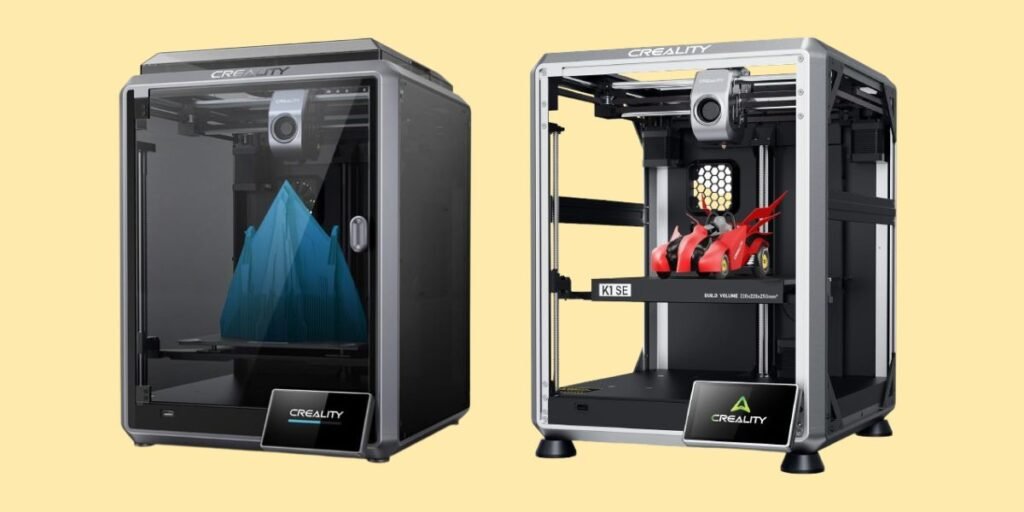
Detailed Comparison & Recommendation
| Feature | Creality K1 | Creality K1 SE | Which Is Best & Why? |
|---|---|---|---|
| Build Volume | ~220 × 220 × 250 mm | Same volume: 220 × 220 × 250 mm | Tie on size—volume is equivalent. |
| Max Speed & Acceleration | Up to 600 mm/s, 20 000 mm/s² | Same specs: up to 600 mm/s, 20 000 mm/s² | Tie on raw speed—both blister fast. |
| Material Compatibility | Supports ABS, PC, PA‑CF in enclosed frame | PLA, PETG, TPU mainly; open‑frame less ideal for high temp. | K1 wins—more versatile materials. |
| Frame / Enclosure | Full enclosure option improves high‑temp stability | Open‑frame by default—less control for tough materials | K1 wins—better environment control. |
| Ideal For… | Makers to small‑businesses printing variety of parts | Hobbyists focused on PLA/PETG, budget‑sensitive | K1 is smarter long‑term choice. |
| Check Best Seller | Check Creality K1 Lowest Price | Check Creality K1 SE Lowest Price | K1 offers better value per dollar for most users. |
What Is the Major Difference Between Creality K1 vs K1 SE?
- The key difference isn’t speed—it’s material capability and enclosure. While both share CoreXY architecture and top‑tier speed specs, the K1 supports tougher materials like ABS, PA, PC thanks to its fully enclosed frame and higher thermal stability. Meanwhile, the K1 SE is an open‑frame printer optimized for PLA/PETG at a lower cost. If your workflow demands versatility or stronger materials—K1 is the clear choice. If you’re strictly printing standard filaments and budget is your biggest concern—the K1 SE serves well.
Check Creality K1 Limited Time Deal Here
What Users Are Saying
| Printer | Feedback Highlights |
|---|---|
| K1 | “Big jump from old FDM—print speed is mind‑blowing.” |
| K1 SE | “Excellent value for speed, but open‑frame takes more ventilation.” |
Fair Advice to Consider
- Choose K1 if you want one machine that handles PLA, PETG, ABS, PC, and possibly composite filaments.
- Choose K1 SE only if you’re sure you’ll print mainly PLA/PETG at lower cost and don’t care about enclosure.
- Both computers need ventilation—even quick machines build heat.
- Check local support and community mods—accessory ecosystem matters.
Quick Comparison
| Spec | K1 | K1 SE |
|---|---|---|
| Build Volume | 220 × 220 × 250mm | 220 × 220 × 250mm |
| Max Speed | Up to 600 mm/s | Up to 600 mm/s |
| Materials Supported | PLA, PETG, ABS, PA, PC | PLA, PETG, TPU |
| Enclosure | Full or optional | Open‑frame |
| Value‑per‑Dollar | Higher | Lower entry cost |
| Best Choice For | Serious makers | Budget hobbyists |
| Recommended Best Seller | Check Creality K1 Lowest Price | Check Creality K1 SE Lowest Price |
Quick Summary
In short: if you want speed, volume and true material flexibility without compromise—go with the Creality K1. The K1 SE gives you a fast printer at lower cost—but locks in more limitations. One decision today determines your next prints and upgrade path.
FAQs
Can both printers hit 300 °C nozzle temp?
Yes—both are rated up to 300 °C for compatible filaments.
Which needs less ventilation?
The K1 has enclosure options that manage fumes and temperature better than the open‐frame K1 SE.
Are mods supported?
Yes, but the K1 SE’s open‑frame makes DIY alterations easier; the K1 has more support for material mods.
What’s the break‑even point on cost?
If you’ll print >30 % of parts in higher temp or advanced materials, the K1 pays off quickly.
Final Verdict
Choose the Creality K1—it’s the one printer that bridges high speed with long‑term usability. If you’re aiming for serious prints, diverse materials and value that lasts, this is the one. Click through and lock it in—upgrade your print room once, and print confidently for years ahead.v
Jump To