You want a 3D printer that delivers high speed, modern features, and durability not just hype. The Bambu Lab A1 is a well‑respected machine with multi‑color support and refined firmware. But Anycubic Kobra 3 pushes stronger specs in many areas higher speed ceiling, more modern features, and a bold promise of future expandability. If you want a printer that scales and outpaces limits, Kobra 3 is built to lead.
Let’s make long story short: A1 gives you a stable, dependable platform with good multi‑material capability. Kobra 3 steps up with higher speed potential, modern automation features, and room to grow. Kobra 3 wins for users who want aggressive specs, future readiness, and more performance per dollar.
Why Do I Recommend Kobra 3?
- Higher top speed & acceleration specs — Kobra 3 is rated up to 600 mm/s with aggressive acceleration (up to 20,000 mm/s²) in some specs.
- Modern leveling & calibration features — It includes LeviQ 3.0 auto leveling, vibration compensation, flow calibration, etc.
- Comparable build volume — 250 × 250 × 260 mm gives you plenty of room for most prints.
- Hotend & material support — Hotend up to 300 °C, allowing a wide range of filaments.
- Strong feature set for automation & usability — AI monitoring, filament sensors, auto resume, more modern UI and design.
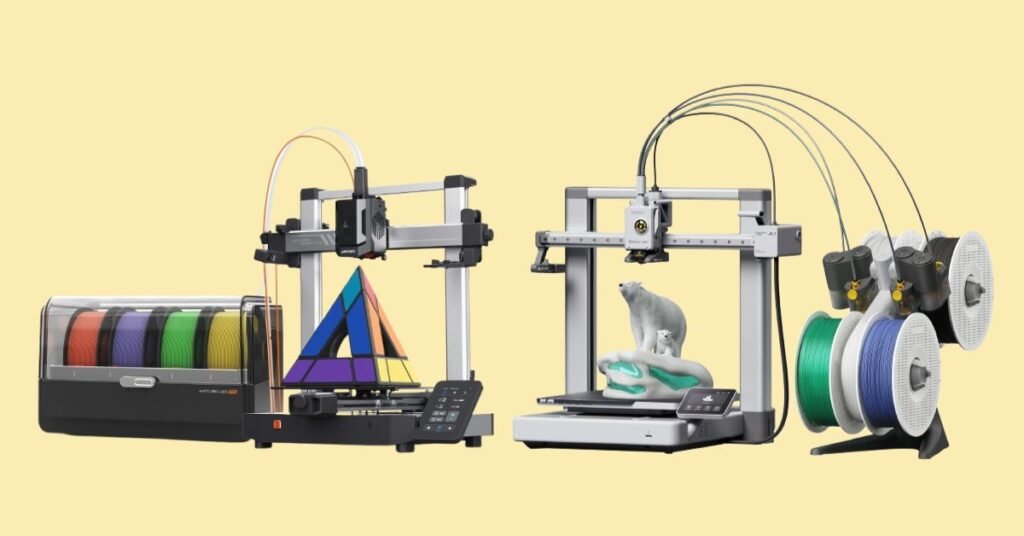
Detailed Comparison & Recommendation
| Feature / Spec | Anycubic Kobra 3 | Bambu Lab A1 | Which Is Best & Why? |
|---|---|---|---|
| Build Volume | 250 × 250 × 260 mm | 256 × 256 × 256 mm | Slight edge to A1 for a tiny extra space, but Kobra 3’s volume is very competitive. |
| Top Speed / Acceleration | Up to 600 mm/s, aggressive specs | Up to ~500 mm/s in Bambu’s spec range | Kobra 3 has clear headroom in speed advantage. |
| Hotend / Material Capability | 300 °C nozzle, supports many filaments | 300 °C hotend in A1 too | Tie — both support advanced materials in many cases. |
| Automation / Calibration | Auto leveling (LeviQ 3.0), flow & vibration compensation, sensors, AI monitoring | A1 has full auto calibration, multi-color capabilities via AMS systems, flow compensation, etc. | Kobra 3 leans stronger in automation for speed workflows; A1 offers a more polished multi-color ecosystem. |
| Footprint / Weight / Build Design | Heavier, larger footprint (~9.2 kg) | ~8.3 kg, compact frame (385 × 410 × 430 mm) | A1 has advantage in lighter weight and easier placement; Kobra 3 trades bulk for performance headroom. |
| Ecosystem & Support | Younger platform, growing community, modularity potential | Mature Bambu ecosystem, strong multi-color support, reliable firmware updates | A1 wins on maturity; Kobra 3 offers more room to grow and flexibility in features |
| Check Best Seller | Check Anycubic Kobra 3 Lowest Price | Check Bambu Lab A1 Lowest Price | Check Best Seller Offers |
What Is the Major Difference Between Kobra 3 vs A1
- Speed potential & performance envelope — Kobra 3’s spec gives you more headroom for aggressive printing.
- Automation built for high-speed workflows — leveling, compensation, sensors are tuned for high-speed response.
- Ecosystem stability vs flexibility — A1 has a more mature, stable support system; Kobra 3 gives you modularity to evolve.
- Design trade-offs: bulk, noise, and calibration — Kobra 3 might demand more tuning or more space versus A1’s more “plug & play” nature.
Check Anycubic Kobra 3 Limited Time Deal Here
What Users Are Saying about Kobra 3 vs Bambu A1
- Tom’s Hardware on Kobra 3: > “Anycubic Kobra 3 … Build Volume, 250 x 250 x 260 mm … PLA/PETG/TPU (up to 300 °C).”
- Filament2Print on Kobra 3: details like speed, volume, extrusion specs.
- Tom’s Hardware on A1: > “Build Volume, 256 × 256 × 256 mm … PLA / PETG / TPU (up to 300 °C).”
- Filament2Print on A1: build, quietness, structure, and materials support.
- User forum / Reddit: > “The K3 Combo … solid machine … gave me almost no problems … slicer is weak, Bambu easier for plug‑and‑play.”
Fair Advice to Consider
- Go Kobra 3 if you: Want peak performance, top speed and aggressive prints. Like pushing boundaries and using newer technology & features. Are comfortable with more tuning and evolving ecosystem. Value flexibility, expansion, and future growth
- Go A1 if you: Prefer a more mature, stable, “it just works” experience. Rely heavily on multi-color printing with AMS systems. Want a lighter, easier printer for smaller spaces. Don’t need ultra-high speed all the time
Quick Comparison – Spec Highlights
| Feature | Kobra 3 | A1 |
|---|---|---|
| Higher top speed | ✅ | ❌ |
| Strong automation & compensation features | ✅ | ✅ (but more cautious design) |
| Large build volume | ✅ (250×250×260) | ✅ (256×256×256) |
| Better ecosystem maturity | ❌ | ✅ |
| Lighter / more compact design | ❌ | ✅ |
| Room for expansion / growth | ✅ | ⚠ |
| Recommended Best Seller | Check Anycubic Kobra 3 Lowest Price | Check Bambu Lab A1 Lowest Price |
Quick Summary
The Bambu Lab A1 is a proven, polished machine with excellent multi-color support and a stable ecosystem. However, Anycubic Kobra 3 offers more aggressive specs higher top speed, stronger calibration / automation, and more flexibility. For makers who push limits and want a machine that grows with them, Kobra 3 is the stronger pick.
FAQs
Will Kobra 3 sacrifice print quality for speed?
At moderate speeds, quality remains excellent. The real test is tuning at high speed — you’ll need to dial in vibration control and calibration.
Does A1 support 300 °C hotend as well?
Yes — A1’s specification includes a 300 °C hotend.
Is multi-color on Kobra 3 as good as A1’s AMS?
Kobra 3 supports modular multi-color via ACE Pro, but the ecosystem is younger and may require more manual tuning.
Which is easier for a beginner to own?
A1 likely gives a smoother onboarding, with mature firmware, community support, and fewer surprises.
Which has better resale / longevity?
Kobra 3 may hold edge for those chasing top specs; A1 may retain value for users wanting reliability and ecosystem continuity.
Jump To