Between the versatile Logitech MX Keys Mini and the feature‑rich Logitech MX Keys S, the smarter investment (for most users) is the MX Keys S. It delivers full‑size comfort, advanced lighting, and multi‑device competence at a price that stays strong while the Mini is excellent for space‑savings but asks you to compromise.
Let’s make long story short: I highly recommend the Logitech MX Keys S because it blends premium typing feel, smart multi‑device support, custom workflows and modern convenience into one go‑to board. If you want one keyboard to rule your desk for years, pick the MX Keys S. Only go with the Mini if your workspace is tight or portability is key.
Why Do I Recommend Logitech MX Keys S
- Smart Illumination & Workflow Friendly – Ambient and hand‑proximity sensors light up the keys just when you reach.
- Seamless Multi‑Device Flow – Connects to up to three devices via Bluetooth or Logi Bolt dongle; switch channels with a tap.
- Full‑Size Comfort & Premium Build – Spherically‑dished keys and solid build lay the foundation for day‑long use.
- USB‑C Recharge for Modern Setup – No disposable batteries, just plug in modern style.
- Right Value, Right Fit – Compared to Mini, you’re getting a complete professional keyboard—not just compact form.
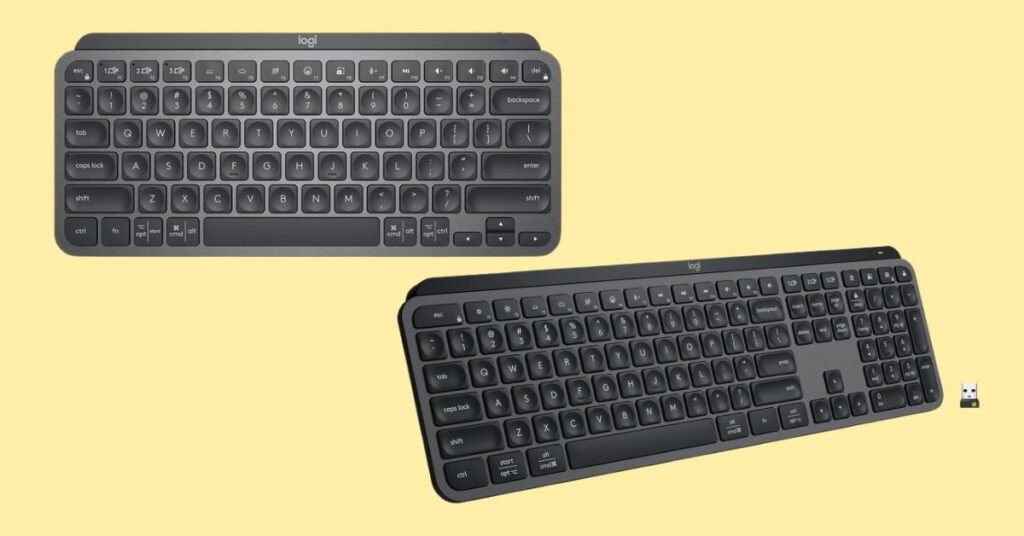
Detailed Comparison & Recommendation
| Feature | MX Keys S | MX Keys Mini | Which Is Best & Why? |
|---|---|---|---|
| Form‑Factor / Size | Full‑size board (includes numpad) | Compact 75 % form, no numpad | MX Keys S wins for full desk ergonomics; Mini wins space‑limited setups |
| Smart Illumination | Advanced back‑lighting + hand‑proximity sensors | Back‑lit, smart sensor but fewer refinements | MX Keys S provides smarter lighting and sensor responsiveness |
| Connectivity / Multi‑Device | Bluetooth + Logi Bolt receiver included | Bluetooth; Logi Bolt adapter sold separately | MX Keys S wins for bundled convenience and ready‑to‑go multi‑device |
| Battery & Charging | USB‑C rechargeable full size | USB‑C rechargeable compact | Tie on charging convenience; value leans S. |
| Value Proposition | Higher tier cost, full board, long‑term use | Lower cost, lightweight premium for compact users | MX Keys S wins for investment value; Mini wins for ultra‑compact space |
| Use Case Fit | Office, creative workflows, productivity power users | Mobile setups, small desks, multi‑device travel | Choose based on environment: S for performance, Mini for portability |
| Check Best Seller | Check Logitech MX Keys S Lowest Price | Check Logitech MX Keys Mini Lowest Price | Check Best Seller Offers |
What Are the Major Differences Between MX Keys Mini vs MX Keys S?
- Size & Layout: Mini omits the numeric keypad for space savings; S gives you the full layout.
- Lighting Intelligence: S offers next‑gen sensing and key‑illumination; Mini has basics.
- Bundled Accessories: S includes Logi Bolt receiver; Mini often requires separate purchase.
- Purpose & Investment: S is built for long‑term desk productivity; Mini is built for flexibility and compact footprint.
Check Logitech MX Keys S Limited Time Deal Here
What Users Are Saying about MX Keys Mini vs MX Keys S
- MX Keys S: “Fantastic build and feel—lighting responds exactly when I reach. Typing feels premium.”
- MX Keys Mini: “Great portable board for remote work—quiet keys and speedy Bluetooth.”
Fair Advice to Consider
- Want a full‑sized keyboard for heavy typing, creative work, multi‑device use? Go MX Keys S.
- Use a small desk, carry your keyboard, do lighter typing workloads? MX Keys Mini fits better.
- Ensure you have the desk space for full size—16.9″ width for S.
- If customization, macros or workflow scripting matter, check the S’s Smart Actions support.
- If budget is tight and you don’t rely on the numpad or smart lighting, the Mini is a strong alternative.
Quick Summary
- Winner Overall: Logitech MX Keys S
- Runner‑Up: Logitech MX Keys Mini — best compact pick
- Buy Recommendation: For serious desk setups & long‑term use → MX Keys S. For portable, space‑savvy setups → MX Keys Mini.
FAQs
The Mini lacks a numpad—is that a deal‑breaker?
If you regularly use spreadsheets, accounting or numeric data entry, yes—S is preferable.
Can I switch between devices like laptop + tablet + phone?
Yes—both support up to three devices; S includes the Logi Bolt dongle out of box.
Does lighting difference really matter day‑to‑day?
If you type in variable lighting or work late, the smarter lighting of S keeps your workflow smoother.
Is compatibility across Windows & Mac good?
Both are excellent for Windows, macOS, Linux and iPadOS; Mac‑layouts supported.
How long will the battery last?
Both recharge via USB‑C. The S board excels with high usability; the Mini also offers solid endurance especially sans numpad.
Final Verdict
If you’re building a premium workstation, typing thousands of words daily, and switching seamlessly between devices—choose the Logitech MX Keys S. It hits performance, comfort and modern workflows. If you value space, portability and still want excellent typing experience—but can accept fewer features—go Logitech MX Keys Mini.
Jump To