When you’re looking to upgrade your 3D printing arsenal, it’s not just about speed or volume—it’s about how the machine fits your workflow, materials, and future ambition. That’s exactly where the showdown between the Creality K1C and the Bambu Lab P1S comes in.
Let’s make long story short: Creality K1C Core XY high‑speed machine built for performance—220 × 220 × 250 mm build volume, up to 600 mm/s print speed, 20,000 mm/s² acceleration. P1S Slightly larger build volume at 256 × 256 × 256 mm, top speed around 500 mm/s, advanced auto‑features and streamlined workflow.
Winner? For most creators aiming to invest in growth, reliability, and ease the Bambu Lab P1S takes the crown.
Why Do I Recommend the Bambu Lab P1S?
- Perfect balance of speed + volume — With 256 mm³ build space and top‑tier motion specs, the P1S covers most printing needs without shrinking your future potential.
- Worry‑free setup & workflow — From automatic bed leveling, smart firmware, to robust quality components, you’ll spend less time tinkering and more time printing.
- High‑end materials capability — Hot‑end rated to ~300 °C, build‑plate to 100 °C, and material support for PLA, ABS, PC, TPU and more.
- Strong ecosystem and usability — The P1S is plugged into a big cloud/app ecosystem, with streamlined slicing and operation—makes it ideal whether you’re hobbyist or semi‑pro.
- Smart value for your investment — Yes, the price is higher than some, but you’re buying a machine that scales with you—fewer upgrades, less frustration, more output.
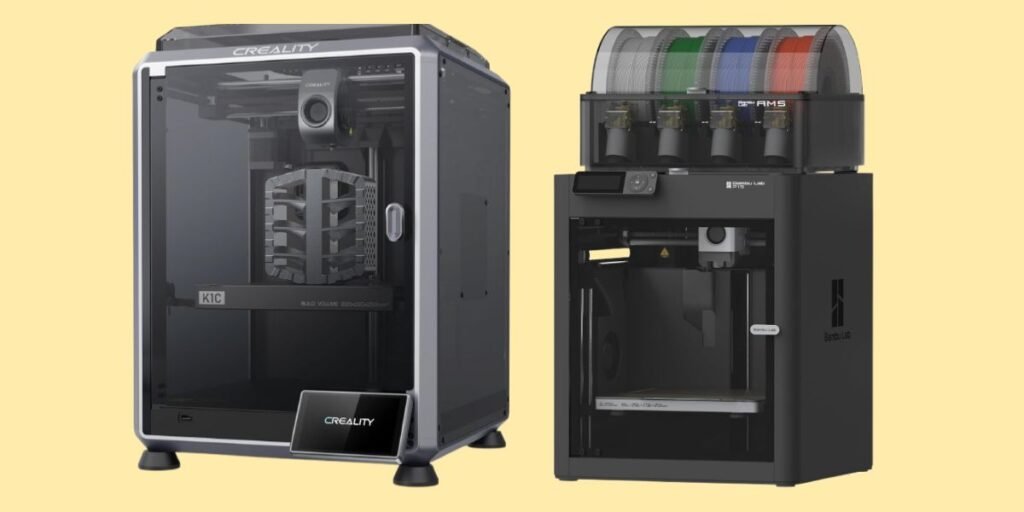
Detailed Comparison & Recommendation
| Feature | Creality K1C | Bambu Lab P1S | Which Is Best & Why? |
|---|---|---|---|
| Build Volume | 220 × 220 × 250 mm | 256 × 256 × 256 mm | P1S wins for more volume—more to print. |
| Max Speed & Acceleration | Up to 600 mm/s, 20,000 mm/s² | Up to ~500 mm/s, 20,000 mm/s² | K1C slightly edges speed—if you need raw pace. |
| Material & Filament Support | Broad: supports PLA‑CF, PA‑CF, carbon‑fiber reinforced filaments | Also supports advanced materials (ABS, PC, TPU etc) | Tie—both strong, but P1S easier for most advanced filaments. |
| Setup, Workflow & Usability | Good performance, but some manual tweaks expected | Excellent workflow, refined software/hardware integration | P1S wins for user‑friendliness. |
| Value & Investment | Lower cost, great speed for the price | Higher cost, but better out‑of‑box experience + future proof | If budget allows, P1S wins long term. |
| Check Best Seller | Check Creality K1C Lowest Price | Check Bambu Lab P1S Lowest Price | Check Best Seller Offers |
What Are the Major Differences Between Creality K1C vs Bambu Lab P1S?
- Speed vs Full Feature: K1C targets top speed, but P1S sacrifices a bit of raw number for better overall usability.
- Volume: P1S gives you ~16% more build area—important if you print larger parts or batches.
- Workflow & Support: P1S emphasizes plug‑and‑play, app integration, auto routines. K1C is powerful—but more “tinker friendly.”
- Future scope: If you’re printing advanced materials and want one machine to grow with—you’ll lean P1S. If speed for standard materials is main goal & budget is tighter—you may lean K1C.
Check Bambu Lab P1S Limited Time Deal Here
What Users Are Saying
Fair Advice to Consider
- Choose P1S if: You plan to work with advanced materials, want big build volume, and want to minimize setup/maintenance hassles.
- Choose K1C if: Your focus is on speed, you have standard materials (PLA, PETG), and you’re okay with more hands‑on setup.
- Note: Both are high‑end machines—ensure your printing space supports ventilation, filament storage and material handling.
- Tip: If budget allows, lean P1S—it offers better longevity and less time troubleshooting down the line.
Quick Summary
For most users who want wide use‑case coverage, reliable prints, growth potential—go with the Bambu Lab P1S.
If you’re focused narrowly on speed, standard filaments, cost sensitivity—the Creality K1C still packs serious value.
Choose based on your materials, workflow and how long you plan this printer to serve you—and you’ll buy with confidence.
FAQs
Can both print carbon‑fiber filled filaments?
K1C clearly supports CF composites.
P1S supports advanced materials but may need AMS or extra setup depending on CF requirement.
Do they auto‑level and ease setup?
P1S excels with auto routines and minimal manual calibration.
K1C has auto‐bed features but may need more manual intervention initially.
Which is faster?
K1C lists higher top speed (600 mm/s) vs P1S (~500 mm/s). But in real print scenarios workflow matters more than raw top number.
Size & footprint differences?
P1S has larger build volume and slightly larger footprint. K1C slightly smaller—factor your space.
Which is more future‑proof?
For growth, varied materials and ease of use—P1S wins. For pure speed and good value—K1C is strong but may limit expandability.
Final Verdict
If I were handing you one 3D printer to last years, with minimal frustration and maximum output—I’d hand you the Bambu Lab P1S.
If I asked: “You want speed now, budget tighter, standard materials?” — the Creality K1C still delivers a ton.
But for most makers aiming for the best all‑round investment: go P1S, buy smart, print hard.
Jump To