You want your TV lighting to react, pop, and immerse not just sit there. Between Govee T2 (Envisual Backlight) and the newer T3 / 3 Lite, both promise smart ambient backlighting. But one pushes the envelope in synchronization, clarity, and installation ease. Let me show you why T3 is the one you’ll enjoy rather than regret.
Let’s make long story short: T2 is solid, feature-rich, and a pioneer in its class. But Govee T3 / 3 Lite refines the experience better integration, easier mounting, and smoother ambient effects making it the smarter pick for most users.
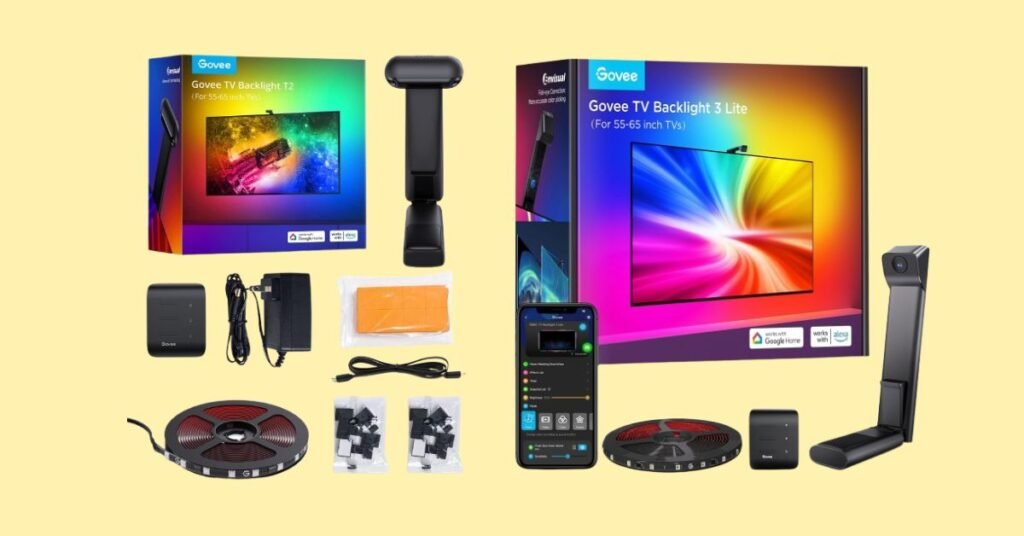
Why Do I Recommend Govee T3?
- Easier installation for ultra‑thin TVs — T3 uses gravitational hanging camera designs that adapt seamlessly.
- Improved synchronization & color mapping — T3 refines matching logic to screen content with fewer lags or color offsets.
- Cleaner profile / design for newer TVs — better mounting and camera placement for modern, slim panels.
- Feature refinement over T2 — T2 was groundbreaking (dual cameras, high LED density) — T3 builds on that with smoother, more user-friendly execution.
Detailed Comparison & Recommendation
| Feature / Spec | Govee T2 (Envisual Backlight) | Govee T3 / 3 Lite | Which Is Best & Why? |
|---|---|---|---|
| LED / Color Tech | RGBIC LED, dual camera color sensing, 60 LEDs/m in many models | RGBIC + W (in some variants), improved color fidelity and warmer tones | T3 offers richer color options and better balance. |
| Camera / Sensing Method | Dual-camera color sensing, captures many pixel dots per half-second | Often uses single/optimized camera with hanging/gravity design for better alignment and flexibility | T3 simplifies and refines the camera scheme for better consistency. |
| Suitable TV Size / Length | T2 supports up to 75–85″ models, typical lengths ~5 m / 16 ft for 75–85 models | T3 / 3 Lite often matched to 55–65″ or 65–75″ ranges, with modular extensions | For common TV sizes (55–65″), T3 gives more focused, optimized performance. |
| Installation / Mounting | Standard rear-lit LED strip + camera mount; can be more fiddly on very slim TVs | Improved mounting schemes (gravitational / hanging camera) tailored for ultra-thin modern screens | T3 wins when TV profile is slim or when cable / angle flexibility matters. |
| App / Feature Polishing | Full app feature set: scene modes, synchronization, presets | Likely improved UI, smoother transitions, adaptive modes based on feedback from earlier models | T3 offers a more polished UX (less lag, better transitions). |
| Value / Cost Premium | T3 is better value for most users who want a more future-ready, stable solution. |
What is the Major Difference Between T2 vs T3
- Camera / Mounting Design — T3 refines the camera system (gravity hanging design) for slimmer TV compatibility.
- Color & White Balance Options — T3 adds RGB + W in models for warmer whites and better blending.
- User & Installation Experience — T3 is more forgiving to alignment errors and simplification in mounting steps.
- Refined Synchronization & Latency — T3’s newer logic minimizes color lag and misalignment.
- Target Size Match — T3 is more optimized for mainstream TV sizes, giving better fill and balance.
Check Govee T3 Limited Time Deal Here
What Users Are Saying
| Feedback / Feature | Govee T2 | Govee T3 / 3 Lite |
|---|---|---|
| Immersive Effect / Brightness | “Color transitions are dramatic and immersive” — The Gadgeteer review praised brightness. | Web manufacturer blogs highlight “take viewing to the next level … simplified installation” for T3 Lite. |
| Installation / Fitting | “Camera looks awkward perched, but works well.” | “Hanging camera design lets it adapt to ultra-thin TVs more gracefully.” |
| Color Accuracy & Sync | Widely lauded for matching content via dual camera (354,000 pixel dots per half-second) | Users note smoother blending and fewer mismatches when scenes change. |
| Trade-offs / Limitations | Some critique on camera mount aesthetics, app bloat. | Some early units may lack maximum LED count or have modular constraints, but refinement is clear. |
| Recommended Best Seller |
Fair Advice to Consider
- Choose T2 if you want more LED density, robust dual-camera sensing, and often discounted pricing as a mature model.
- Choose T3 if your TV is ultra-thin or you want installation simplicity, smoother app experience, refined color balance, and fewer alignment headaches.
- If you prioritize durability and long-term satisfaction from ease of use more than raw specs, T3 is safer.
- For early adopters who enjoy tinkering and squeezing every spec inch, T2 still delivers strong performance.
Quick Comparison
| Feature | T2 | T3 / 3 Lite |
|---|---|---|
| RGBIC color backlight | ✅ | ✅ |
| Dual-camera sensing | ✅ | ✅ (optimized mounting) |
| Hanging / gravity camera | ❌ | ✅ for ultra-thin TV support |
| RGB + W white LED mode | ❌ | ✅ (in some T3 models) |
| Easier mounting experience | ❌ | ✅ |
| Color sync & transition smoothness | ✅ strong | ✅ improved refinement |
| Price |
Quick Summary
T2 is powerful, dense, and full-featured, but its design and mounting may show its age on modern slim TVs. T3 / 3 Lite streamlines that power into a sleeker experience — smoother transitions, better alignment, and more forgiving installation. For most buyers chasing that “immersive backlight” without frustration, T3 wins.
FAQs
Does T3 support RGB + W mode?
Yes — some T3 / 3 Lite variants add a White LED channel to better handle whites and warmer tones.
Can T3’s hanging camera work with thick bezels?
It may require adjustment; the gravity mount is optimized for slim bezels, but flexibility exists in mounting position.
Is the LED density in T3 lower than in T2?
Possibly in some models; T2 often has 60 LEDs/m in many kits.
Does T3 improve sync latency over T2?
Yes — the logic and color-matching algorithms have been refined to reduce lag.
Are both controllable via the same Govee app and smart assistants?
Yes — both integrate with Govee app, Alexa, Google Assistant, and support scene presets, voice control, etc.
Final Verdict
If you want raw spec boldness, T2 is still a beast. But if you want your lighting system to just work — without alignment fuss, color lag, or awkward camera mounts — T3 / 3 Lite offers the refined, polished experience. For immersion without irritation, T3 is the smarter pick.
Jump To