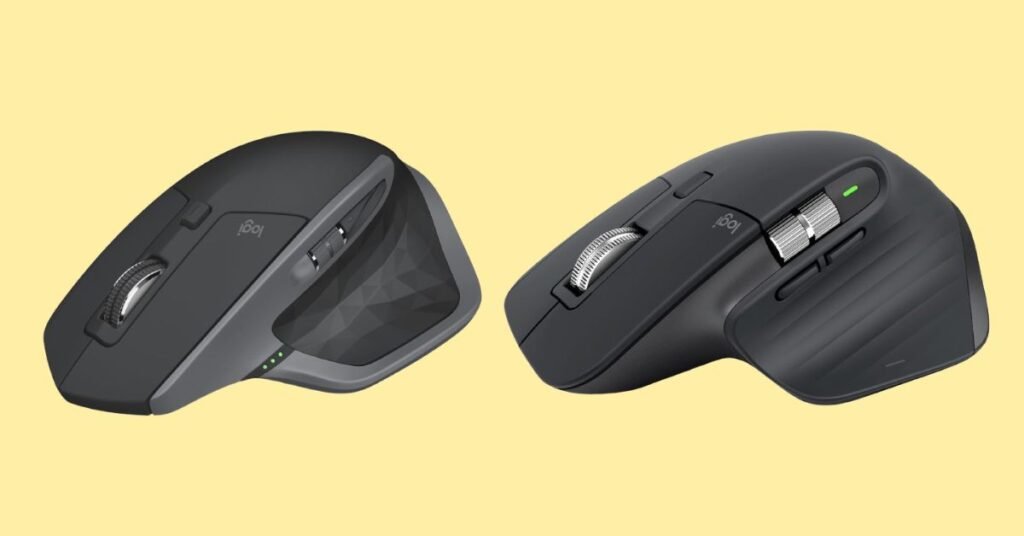
Logitech MX Master 2S is a productivity-focused wireless mouse that features Darkfield laser tracking (up to 4,000 DPI), multi-device Flow control, ergonomic design, and a scrolling wheel that supports both click mode and free spin mode.
Logitech MX Master 3S is the newer successor, offering several upgrades: quieter clicks, improved sensor (8,000 DPI), updated wireless (Bolt receiver support), and refined build & controls.
The 3S builds on 2S’s strong foundation by improving key usability aspects while retaining what users love.
Let’s make long story short: If you want the quietest clicks, better precision, and newer wireless features for future compatibility, go with MX Master 3S. The 2S is still very capable and may be more cost-effective today, but 3S is better prepared for advanced workflows.
Why Do I Recommend the MX Master 3S?
- Quieter clicks — 3S offers significantly quieter left/right clicks, reducing noise in shared or quiet environments.
- Better sensor / higher DPI — 3S supports up to 8,000 DPI, giving more precision especially for high-resolution displays.
- Wireless / receiver upgrade — 3S supports the newer Logi Bolt receiver (in addition to Bluetooth), which is more robust and less susceptible to interference than the Unifying receiver used by older models.
- Refined ergonomics & build — Reviewers note that the 3S feels “exceptionally well-built” and offers superb comfort for long use.
- Future-proofing — As Logitech continues developing firmware and software, 3S is more likely to receive longer support and compatibility with newer operating systems and accessories.
Detailed Comparison & Recommendation
| Feature / Spec | MX Master 2S | MX Master 3S | Which Is Best & Why? |
|---|---|---|---|
| Sensor / DPI | Up to 4,000 DPI with Darkfield laser tracking | Up to 8,000 DPI (higher precision) | 3S has a clear advantage for high-res setups and precision tasks. |
| Click Noise / Feedback | Standard click sound (audible) | Quieter, reduced noise clicks | 3S wins for quieter environment and smoother user experience. |
| Connectivity / Receiver | Uses Logitech Unifying receiver + Bluetooth (older standard) | Supports Logi Bolt + Bluetooth (newer wireless tech) | 3S has more robust and modern wireless options. |
| Ergonomics / Build / Comfort | Solid ergonomic design, comfortable for long use | Refined build, premium feel, excellent ergonomics | 3S improves premium feel while retaining comfort. |
| Scroll & Controls | Scroll wheel with SmartShift mode & side scroll, good control | Same scroll/toggle modes, same side scroll, refined control | Tie in core scrolling function. |
| Battery / Runtime | Rated up to 70 days on a single charge | Also ~70 days with similar battery design | Both strong; no major advantage. |
| Check Best Seller | Check MX Master 2S Best Price | Check MX Master 3S Best Price | 2S gives better value for those who don’t need all upgrades. |
What Are The Major Differences
- Sensor upgrade: 3S supports 8,000 DPI vs 2S’s 4,000 DPI → smoother movement especially on high-res monitors.
- Click noise: 3S offers quieter clicks, a noticeable upgrade in shared or quiet workspaces.
- Wireless / Receiver: 3S supports Bolt (more robust) in addition to Bluetooth; 2S uses Unifying + Bluetooth.
- Build & feel: 3S feels more premium and refined, though shape is similar.
- Value / cost trade-off: 2S often cheaper; 3S is better headroom and features if budget allows.
Check MX Master 3S Limited Time Deal Here
What Users Are Saying
| Feature / Feedback | MX Master 2S Users / Reviews | MX Master 3S Users / Reviews |
|---|---|---|
| Precision & Sensor | “Good precision up to 4,000 DPI; works well on various surfaces.” | “8,000 DPI is overkill for my daily use but ensures smoothness on 4K monitors.” |
| Noise / Click Feel | “Clicks are satisfying but audible.” | “Quieter clicks are a major improvement — really welcome for calls and shared spaces.” |
| Wireless & Receiver Experience | “Unifying works fine, though occasionally interference-heavy in busy setups.” | “Bolt gives more stable connectivity; less lag or dropouts in crowded RF environments.” |
| Ergonomics & Comfort | “Comfortable for extended use.” | “Feels premium, comfortable, better build.” |
| Recommended Best Seller | Check MX Master 2S Best Price | Check MX Master 3S Best Price |
Fair Advice to Consider
- If you’re upgrading from a much older model or have high-resolution displays, the jump to 3S gives more perceived smoothness and versatility.
- If you mostly use standard settings, the 2S will work just fine and you might not notice all the 3S advantages.
- For shared/office environments, the quieter clicks of 3S can reduce disruptions.
- Check your wireless environment — if you’re in a crowded RF space, 3S’s Bolt advantage may matter more.
- Consider budget: If 3S’s price premium is large, 2S offers strong value.
Quick Comparison – MX Master 2S vs MX Master 3S
| Feature / Spec | Logitech MX Master 2S | Logitech MX Master 3S |
|---|---|---|
| DPI / Sensor Precision | Up to 4,000 DPI | Up to 8,000 DPI – smoother on high-res displays |
| Click Sound | Standard, audible clicks | 90% quieter clicks |
| Wireless Tech | Unifying receiver + BT | Newer Logi Bolt + BT |
| Ergonomics / Comfort | Excellent, sculpted grip | Same proven ergonomic design |
| Scroll Wheel | SmartShift wheel, free-spin & ratchet | MagSpeed wheel, smoother & faster |
| Battery Life | ~70 days per charge | ~70 days per charge |
| Best For | Budget-conscious buyers | Power users, professionals |
| Price | Check MX Master 2S Best Price | Check MX Master 3S Best Price |
Final Verdict
If I were choosing today, I’d pick the Logitech MX Master 3S. Its quieter clicks, more precise sensor, and improved wireless make it more future-proof and agreeable for demanding users and modern setups. The MX Master 2S is still a solid mouse — especially if you can get it at a discount — but the 3S gives meaningful upgrades that justify the price gap for many users.
Jump To