Digital family calendars are more than just screens they’re the hub that keeps everyone organized, synced, and on schedule. The Skylight Calendar 15″ brings smart, wall‑mounted organization in a compact size, while the Skylight Calendar Max 27″ expands that experience with a larger display and enhanced view. If you want a modern, distraction‑free center of family planning that’s easy to use and fits your space, one clearly stands out for most homes.
Let’s make long story short: I recommend the Skylight Calendar 15 The 15″ model is big enough to see your full calendar, chores, lists, and reminders at a glance, yet slim, affordable, and perfect for kitchens, entryways, or offices. The 27″ Calendar Max adds a massive display and is impressive, but the 15″ hits the sweet spot for most families same syncing power, easier setup, and better value for day‑to‑day life. Considering space, price, and practicality, the 15″ is the smarter choice for most homes.
Why Do I Recommend the Skylight Calendar 15
- Perfect Size for Family Use: Big enough to see weekly and monthly views clearly without overwhelming your wall or counter space.
- Wall or Table Placement: It fits in almost any room — kitchen, hallway, and even offices — without needing a huge wall.
- Auto‑Sync Magic: Syncs instantly with Google, Apple, Outlook, Yahoo, and more — so calendars update automatically.
- Interactive Features: Add chores, to‑dos, meal plans, or lists and check them off easily.
- Mobile App Control: Update from your phone on the go — no need to stand right in front of it.
- Best Value: Offers most everyday features of the 27″ model at a fraction of the cost, while keeping the core goal — organize your household schedule with ease — front and center.
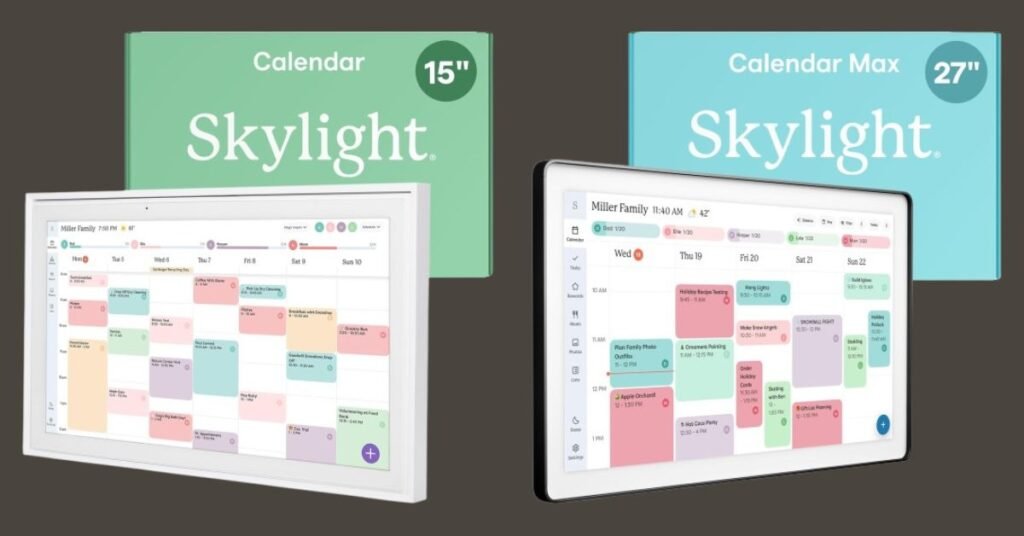
Detailed Comparison & Recommendation
| Feature | Skylight Calendar 15 | Skylight Calendar 27 (Max) | Which Is Best & Why? |
|---|---|---|---|
| Display Size | 15″ HD touchscreen | 27″ HD touchscreen | 15″ hits the everyday sweet spot |
| Family Sync | Yes – Google, Apple, Outlook + | Yes – same syncing | Both sync seamlessly |
| Chore & To‑Do Lists | Yes | Yes | Tie |
| Meal Planning & Smart Lists | Yes | Yes | Tie |
| Photo Screensaver Mode | Optional (Plus Plan) | Optional (Plus Plan) | Tie |
| App Integration | Yes | Yes | Tie |
| Best For | Most homes, kitchens, corridors | Larger spaces, dedicated command centers | 15″ for everyday use |
| Check Best Seller | Check Skylight Calendar 15 Lowest Price | Check Skylight Calendar 27 Lowest Price | 15″ is value winner |
What Is the Major Difference Between Skylight Calendar 15 vs 27
- Skylight Calendar 15 gives you a balanced, easy‑to‑read size that’s ideal for kitchens, entrances, or family centers where space is limited but visibility is vital. It still syncs with all calendars, supports chore lists, meal planning, and app control without overwhelm.
- Skylight Calendar 27 (Max) is a larger display that feels like a family hub or command center for big houses or large spaces. It’s great if you need maximum visibility from across a room, but it’s not typically needed for everyday scheduling tasks.
What Users Are Saying About Skylight Calendar 15 vs 27
| Feature | Skylight Calendar 15 | Skylight Calendar 27 |
|---|---|---|
| Space Fit | “Perfect for kitchen and entryway — not too big.” | “Huge display looks great but needs wall space.” |
| Calendar Views | “Easy to read weekly and monthly at a glance.” | “Huge month view is nice but overkill for small rooms.” |
| Daily Use | “We use touch events and chores every day.” | “Great command center feel, but pricey.” |
| Sync & Setup | “Connected to Google calendar quickly and smoothly.” | “Syncs the same, just larger and more visible.” |
| Recommended Best Seller | Check Skylight Calendar 15 Lowest Price | Check Skylight Calendar 27 Lowest Price |
Fair Advice to Consider
- Get the 15″ if you want efficient family organization, easy visibility, and smart syncing without dominating your living space.
- Choose the 27″ Max only if you have a big wall, want the largest view possible, and plan to use it like a weekly command board for multiple people.
- A subscription (optional) unlocks extra convenience tools like photo screensaver, Sidekick AI, meal planning dashboard, and chore rewards — worth it if you want deeper planning features.
Quick Comparison
| Quick Highlight | Skylight 15 | Skylight 27 (Max) |
|---|---|---|
| Display Size | 15″ | 27″ |
| Sync Services | ✔️ | ✔️ |
| Chore & Lists | ✔️ | ✔️ |
| Photo Mode | Optional | Optional |
| Best for | Most homes | Larger spaces |
| Price | Check Skylight Calendar 15 Lowest Price | Check Skylight Calendar 27 Lowest Price |
Quick Summary
The Skylight Calendar 15″ brings smart family scheduling into a size that fits every home, syncs automatically with your calendars, and supports chores, to‑dos, and meal planning. The 27″ Calendar Max gives a larger viewing canvas ideal for big spaces, but for everyday organization, the 15″ is the sweet spot — easier to place, simpler to use, and better value overall.
FAQs
Do both calendars sync with Google Calendar?
Yes — both the 15″ and 27″ models auto‑sync with Google, Apple, Outlook, Yahoo, and more.
Can I mount them on a wall?
Yes — both include wall‑mount options or stand placement.
Do they need a subscription?
No — core features work without it, but the Plus Plan unlocks bonus features like Sidekick AI and chore reward systems.
Final Verdict
For most families who want dependable schedule management, chore tracking, meal planning, and daily organization without taking over an entire wall — the Skylight Calendar 15″ is the best choice in 2025. It strikes the right balance between size, functionality, and price — making it the smart pick for everyday life.
Jump To