ApoloSign focuses on a larger full‑HD interface with dual‑mode digital calendar, multi‑calendar sync plus Android‑powered apps for versatile use around the house. Meanwhile, Skylight delivers a family‑centric smart wall calendar with intuitive sync to Google, Apple, Outlook and shared lists for to‑dos and chores perfect for busy families and command centers.
Let’s make long story short: If you need a large digital calendar for simple wall display, shared family events, and easy syncing, the Skylight Calendar handles it with clean visuals and simplicity.
But if you want a more powerful home hub with a larger screen, smart app flexibility, and Android versatility, the ApoloSign 21.5” Digital Calendar is the better investment.
Why Do I Recommend the ApoloSign 21.5 Digital Calendar?
- Bigger display means easier at‑a‑glance visibility from anywhere in your home.
- Real smart hub use allows life, reminders, photos, tasks and apps — all in one place.
- No ongoing subscription required to use the core features — a real homeowner‑friendly value.
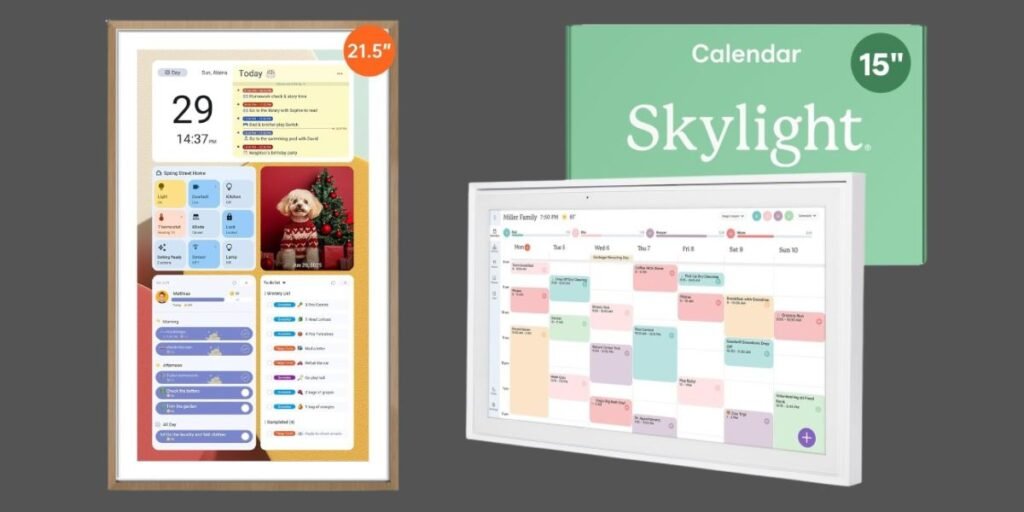
ApoloSign vs Skylight Detailed Comparison & Recommendation
| Feature | ApoloSign 21.5” Digital Calendar | Skylight Calendar (15”) | Which Is Best & Why? |
|---|---|---|---|
| Screen Size & Clarity | Large 21.5” Full HD touchscreen | 15” HD touchscreen | ApoloSign wins — bigger, easier to see from across the room. |
| Calendar Sync | Multi‑calendar sync (Google/Outlook/etc) | Sync with common calendars | Tie — both sync well, but ApoloSign’s dual‑mode support gives more versatility. |
| Smart Features | Android + apps, voice & smart control | Planner + chores + lists | ApoloSign wins — more smart hub capabilities beyond calendar. |
| Family Organizer Tools | Shared calendar & planners | Chore charts & lists | Skylight has slight edge family task tools — if that’s your only need. |
| Check Best Seller | Check ApoloSign Lowest Price | Check Skylight Lowest Price | ApoloSign wins value — more functions without ongoing cost. |
What Is the Major Difference Between ApoloSign vs Skylight?
- ApoloSign 21.5” is built as a multi‑purpose family hub: calendar, planner, smart wall tablet with Android capabilities, photo display, smart home integration, and more. It’s designed to be the central brain of your household scheduling and information tasks.
- Skylight Calendar focuses on being a beautiful family organizer that syncs events and chores in a simple, intuitive interface. It’s exceptional if your goal is calendar and chore management, but it doesn’t double as a smart hub or media display in the same way.
Check ApoloSign Limited Time Deal Here
What Users Are Saying About ApoloSign vs Skylight
| Product | User Feedback Summary |
|---|---|
| ApoloSign 21.5” Digital Calendar | Users highlight the large, easy‑to‑read display, solid sync with phones, and versatile planner modes — praising the dual calendar and multitasking abilities. |
| Skylight Calendar (15”) | Owners love its simplicity and family organization features — especially chore charts and color‑coded events — but some mention subscription for premium features. |
Fair Advice to Consider
- If you want a straightforward, family wall calendar with task lists and chore charts, Skylight is easy and intuitive.
- If you want a larger, smarter home command hub that does more than just calendars, ApoloSign brings multi‑function display and app support together.
- Think about how many features you’ll actually use daily — more isn’t always better unless it matches your life rhythm.
Quick Summary
Both calendars are great, but ApoloSign 21.5” edges ahead thanks to its larger screen, versatile dual‑mode display, Android smart features and better all‑around value. Skylight is excellent for core family calendars, but ApoloSign turns your wall calendar into a central smart home hub.
FAQs
Do these require subscriptions?
The core calendar functions work without cost, though Skylight optionally offers a subscription for premium features.
Can I sync with phone calendars?
Yes — both devices sync easily with popular calendars like Google, Apple and Outlook.
Which is better for family chores?
Skylight Calendar has built‑in chore chart features that are friendly for kids.
Final Verdict
Go with the ApoloSign 21.5” Digital Calendar — it gives a smarter, more capable, more future‑ready experience at competitive value and enhances daily life well beyond scheduling alone. Perfect for families or anyone wanting a central timeline and information hub.
Jump To