When it comes to keeping your home organized and your family schedules visible, digital calendars have become must‑have tools. The Skylight Calendar 10‑inch offers portable convenience at a lower price, while the Skylight Calendar 15‑inch brings a larger high‑definition touchscreen and easier readability for households juggling multiple events. Both sync with your calendars, to‑dos, chores and reminders via a dedicated app, but one clearly delivers better everyday utility for real‑world family life. Let’s break it down.
Let’s make long story short: I recommend the Skylight Calendar 15 because it balances screen size, visibility and organization features that make planning ahead simple and stress‑free for busy families or shared households. For everyday use, the bigger display really matters it keeps your schedule in view, not buried in menus or apps.
Why Do I Recommend the Skylight Calendar 15
- Bigger Display = Better Everyday Use: The 15‑inch screen delivers larger text and easier navigation than the 10‑inch version. For families with multiple schedules, chores, reminders and routines, being able to see everything clearly at a glance makes a real difference — especially in high‑traffic spaces like kitchens or living rooms.
- Easier Shared Visibility: A larger screen means more events visible simultaneously — no constant scrolling or zooming required. That’s where 15‑inch outshines 10‑inch, especially when multiple people rely on the calendar throughout the day.
- Smart Planning Features All in One Place: Both models sync with your Google, Outlook, Apple and other calendars and support color‑coded appointments, chore tracking, lists and weather. But on the 15‑inch, all this information feels less cramped and more actionable — reducing confusion and simplifying planning across busy days.
- Family‑Friendly Experience: Kids and adults alike interact with the calendar more easily when they’re not squinting at tiny text or cramped icons — a practical advantage of the 15‑inch screen every parent appreciates.
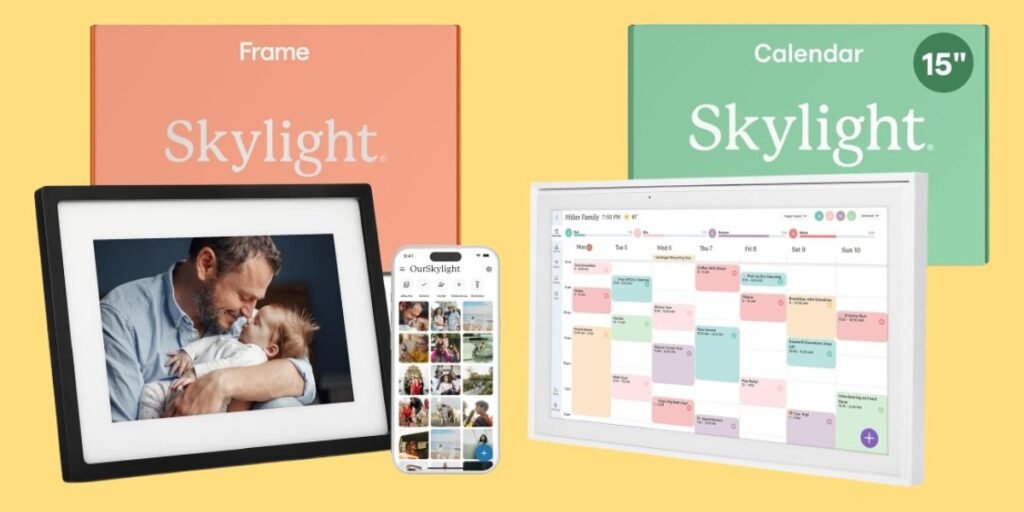
Detailed Comparison & Recommendation
| Feature / Capability | Skylight Calendar 10 | Skylight Calendar 15 | Which Is Best & Why? |
|---|---|---|---|
| Screen Size | 10‑inch | 15‑inch | 15‑inch — easier to read & use daily |
| Calendar Visibility | Compact | Larger, clearer | 15‑inch — more visible at a glance |
| Portability | Slightly lighter | Larger but still versatile | Great, but 15‑inch wins for usability |
| Family Use | Works | Better for multiple users | 15‑inch — better shared visibility |
| Sync Features | Yes | Yes | Both sync well with major calendars |
| Best For | Small spaces or individual use | Busy families & shared spaces | Skylight Calendar 15 |
| Check Best Seller | Check Skylight Calendar 10 Lowest Price | Check Skylight Calendar 15 Lowest Price | Check Best Seller Offers |
What Are the Major Differences
- Display Size & Readability
- Skylight Calendar 10: A compact digital planner with a touchscreen that syncs your schedules and reminders — ideal for desks, counters or personal use.
- Skylight Calendar 15: Offers a larger HD touchscreen that displays more calendar events, lists and chores at once without squinting or scrolling. This makes it much easier for everyday family use and shared spaces.
- Ease of Use
- The 10‑inch edition is great for smaller spaces or lighter schedule needs.
- The 15‑inch brings comfort, clarity and speed — you get a broader view of the week or month at once, and it reduces friction when checking or updating plans.
- Family & Shared Use
- In households where multiple people — kids included — check the calendar daily, the 15‑inch’s visibility wins because everyone from young kids to adults can clearly see events across the week without crowding around a small screen.
- Value Over Time
- A slightly higher price for the 15‑inch often pays off because it’s less likely you’ll ever feel limited by the size or have to upgrade later.
Check Skylight Calendar 15 Limited Time Deal Here
What Users Are Saying
| Feedback Category | Skylight Calendar 10 | Skylight Calendar 15 |
|---|---|---|
| Display Clarity | Good for small rooms | Better for busy families |
| Scheduling Ease | Compact calendar | Easier to view events at a glance |
| Family Use | Works for one or two users | Great for multiple schedules |
| Daily Interaction | Fine | More intuitive for shared use |
| Value | Budget‑friendlier | Better utility for heavy planning |
| Recommended Best Seller | Check Skylight Calendar 10 Lowest Price | Check Skylight Calendar 15 Lowest Price |
Fair Advice to Consider
- Choose Skylight Calendar 10 if you want a portable digital planner for a desk, counter, bedroom or smaller space where full family scheduling isn’t needed.
- Choose Skylight Calendar 15 if multiple people rely on the calendar daily — for schools, work, chores, family activities, vacation planning or reminders; it’s easier to read and use for busy households.
- If your priority is quick visibility and shared organization that everyone understands at a glance, the 15‑inch delivers more value.
Quick Summary
Both Skylight Calendar sizes give you digital family organization that keeps everyone on the same page. But the 15‑inch model stands out for everyday use, with a larger display that makes scheduling, chores, lists and reminders truly effortless to see and interact with across the household.
FAQs
Do the calendars sync with Google or Apple calendars?
Yes — both the 10‑inch and 15‑inch sync with Google, Outlook and Apple calendars via the Skylight app.
Can I manage schedules from my phone?
Yes — the free Skylight mobile app lets you add or edit events remotely and they update on the display.
Do I need Wi‑Fi for both models?
Yes — both require Wi‑Fi to sync and display your calendars.
Final Verdict
Skylight Calendar 15 Best Choice for Shared Family Organization While the 10‑inch version is fine for personal or limited use, the 15‑inch Skylight Calendar delivers superior readability, shared usability and everyday practicality making it the stronger choice for most households. Whether you’re coordinating kids’ activities, work meetings, chores or grocery lists, the larger screen makes staying organized easier and more intuitive for everyone.
Jump To